
AI Music Video Storyboards: Plan Shots Before Production

AI music video storyboards give artists a faster way to see a visual idea before cameras, motion capture, CGI assets, or virtual stages are locked. Instead of waiting until production to discover that a scene feels too crowded, too expensive, or off-brand, the team can test the video’s rhythm while the song is still guiding every decision.
For a CGI-heavy release, the storyboard is no longer just a drawing sequence. It becomes a creative control layer for camera language, performance beats, avatar continuity, visual effects, edit timing, social cutdowns, and approval. That is why artists working with AI music video production need a planning process that is both imaginative and practical.
This guide explains how AI-assisted storyboards help artists, labels, directors, and VFX teams plan better shots before production begins, while keeping the artist’s identity and rights protected.
Table of Contents
Why AI Storyboards Matter for Music Videos
Music videos move differently from commercials, short films, or social clips because the song controls the structure. A storyboard has to follow verses, hooks, drops, performance intensity, costume changes, and visual motifs. AI can help explore variations quickly, but the best results still depend on strong direction from the artist and creative team.
When a concept includes 3D worlds, digital doubles, motion capture, or virtual production, shot planning becomes even more important. A single weak decision can affect asset builds, camera paths, lighting, choreography, and render time. AI-assisted storyboards help the team compare options before those decisions become expensive.
Speed: explore scene ideas, transitions, lighting moods, and camera frames earlier in the process.
Clarity: align the artist, director, label, choreographer, VFX team, and editor around one visual plan.
Budget control: identify which shots need CGI, practical footage, virtual production, or a simpler approach.
Continuity: keep the artist’s identity consistent across the main video, teasers, cover visuals, and live screens.

AI Storyboards vs Traditional Preproduction
Traditional preproduction is still essential. Directors still need treatments, shot lists, budgets, schedules, location plans, wardrobe direction, and crew communication. AI storyboarding does not replace that craft. It adds a faster visual testing layer between the treatment and production plan.
Traditional storyboard: best for approved frames, narrative order, and production documentation.
AI-assisted storyboard: best for rapid mood exploration, visual alternatives, and early creative alignment.
3D previs: best for camera movement, spatial blocking, CGI staging, motion capture, and virtual sets.
Best workflow: use AI for exploration, human direction for taste, and previs for production certainty.
For songs that need surreal environments or avatar-led performance, the storyboard often feeds directly into music video previsualization. The earlier a team can see timing and camera logic, the easier it is to decide what belongs in CGI, what belongs on set, and what can become a reusable campaign asset.
Where Storyboards Fit in the Artist Journey
A good storyboard supports the full release cycle, not only the shoot day. The same decisions that shape a hero shot can affect teaser clips, album visuals, live backgrounds, fan experiences, and future avatar appearances.
Discovery: visual tests show whether the song wants realism, fantasy, performance energy, or a symbolic world.
Approval: labels, managers, and collaborators can review mood, cost, and feasibility before production starts.
Production: storyboard choices become shot lists, capture notes, VFX priorities, and edit expectations.
Campaign: the approved visual system can expand into reels, album art, posters, stage screens, and fan content.
Use Cases for AI Music Video Storyboards
Different artists need storyboards for different reasons. A pop artist may need fast approval on choreography and color. A rap artist may need bold performance framing and environment shifts. An electronic artist may need abstract worlds that can later become live visuals. A virtual artist may need avatar rules that stay consistent across every frame.
CGI music videos: plan impossible sets, creature moments, stylized camera moves, and final render priorities.
Artist avatars: protect likeness, wardrobe, movement, and recurring character traits across releases.
Motion capture: define choreography beats, hero angles, facial performance needs, and retargeting priorities.
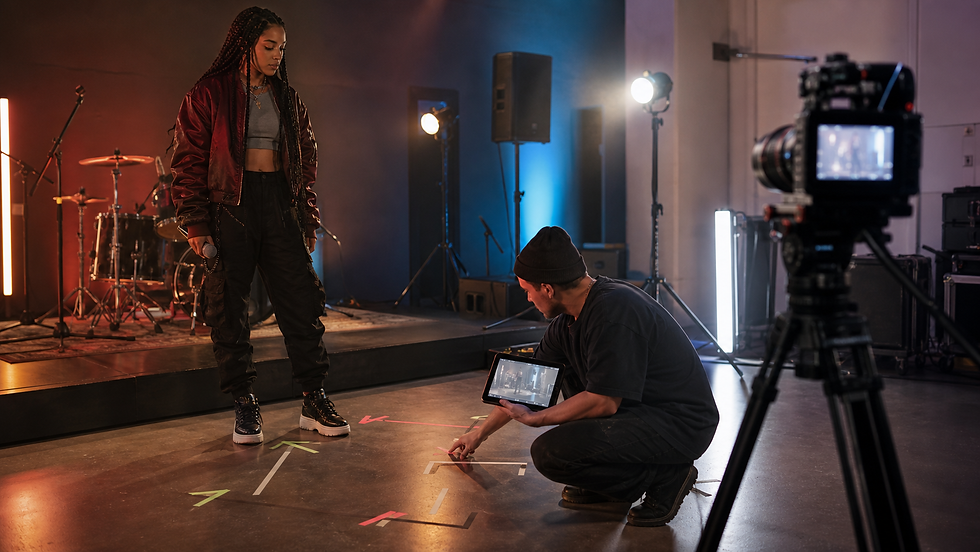
Virtual production: preview LED backgrounds, parallax, lighting direction, and practical camera coverage.
Social campaigns: identify which shots can become hooks, vertical edits, loops, thumbnails, and reveal moments.
This is also where a team can connect the storyboard to a broader artist avatar strategy instead of treating every video as a disconnected visual experiment.
Inputs to Prepare Before Storyboarding
AI storyboarding works best when the creative team gives it useful boundaries. Vague prompts produce attractive but disposable pictures. Specific inputs produce frames that can become production decisions.
Song structure: tempo, sections, lyric moments, emotional turns, and edit points.
Artist identity: wardrobe, movement style, visual references, avatar rules, and brand boundaries.
Asset needs: characters, environments, props, scans, rigs, set pieces, and VFX priorities.
Platform plan: main video, vertical clips, album visuals, thumbnails, stage screens, and fan activations.
Rights boundaries: likeness approval, AI reference rules, synthetic voice limits, and reuse permissions.
Step-by-Step AI Storyboard Workflow
The workflow should begin with the song, not with random image generation. The creative question is not “what looks cool?” It is “what visual rhythm makes this track feel larger, clearer, and more memorable?”
1. Map the track: identify story beats, performance sections, hook moments, and required deliverables.
2. Define the visual grammar: lenses, color, movement, wardrobe, camera energy, and world rules.
3. Generate controlled variations: test a few directions without changing the artist’s identity every time.
4. Select production frames: choose shots that answer real decisions about CGI, performance, lighting, and budget.
5. Move into previs: convert approved frames into timing, camera blocking, virtual stages, and capture notes.
6. Build the campaign kit: identify stills, loops, teasers, thumbnails, album visuals, and live-screen extensions.

For ambitious CGI sets, this workflow can lead into virtual production for music videos where the storyboard becomes a reference for LED stages, virtual cameras, lighting tests, and artist performance coverage.
Mistakes to Avoid When Using AI Storyboards
Chasing pretty frames that cannot be filmed, animated, staged, or edited within the real production plan.
Changing the artist’s face, styling, or identity across every visual test until the concept loses continuity.
Ignoring edit rhythm, so the images look cinematic but do not support the song’s sections or hook energy.
Skipping rights and consent decisions around likeness, AI references, motion data, and future asset reuse.
Forgetting campaign outputs until after production, which leaves social clips, cover art, and stage visuals underplanned.
KPIs for a Strong Storyboard Process
Storyboards are creative, but they can still be measured. A useful process should reduce uncertainty and improve decisions before the most expensive work begins.
Approval speed: how quickly the artist, label, and production team agree on the visual direction.
Shot confidence: how many frames become usable shot-list or previs references.
Revision reduction: whether fewer late changes hit CGI, motion capture, edit, and render stages.
Asset reuse: how many approved scenes support teasers, vertical edits, album visuals, or live performance screens.
Identity consistency: whether the artist’s look, movement, and world remain recognizable across formats.

Responsible AI, Rights, and Artist Identity
AI-assisted planning can touch sensitive creative material: likeness, unreleased music, wardrobe, stage design, brand partners, motion data, and future avatar use. That means responsibility has to be part of the storyboard process from the beginning.
Consent: define approved uses for artist likeness, AI references, motion capture, and synthetic tests.
Approval: decide who signs off on frames before they become assets, prompts, previs, or public visuals.
Storage: control access to scans, references, rigs, tests, and unreleased campaign material.
Boundaries: keep AI as a creative planning tool, not a substitute for the artist’s authorship.

Future Trends for AI Storyboards
AI storyboards are moving closer to real-time production. The next wave will connect mood exploration, 3D previs, virtual cameras, motion capture, and campaign asset planning in one faster loop. Artists will not only preview a music video; they will preview how a visual world can travel across platforms.
That matters for teams exploring digital avatars for music videos, VR music videos, virtual concerts, holographic concerts, and immersive fan experiences. The storyboard becomes a bridge between a song and a visual universe.
For more context, the same planning logic also supports VR music videos and holographic concerts, where a single approved visual language can extend from the music video into live performance.
FAQ
What are AI music video storyboards?
They are storyboard frames or sequences developed with AI-assisted visual exploration and human creative direction. They help teams test mood, shots, camera ideas, CGI needs, and campaign assets before production.
Do AI storyboards replace a director or storyboard artist?
No. They support exploration and alignment. A director, artist, producer, or storyboard artist still controls taste, story, feasibility, performance, and approval.
Why are storyboards useful for CGI music videos?
CGI requires early choices about environments, camera movement, animation, lighting, effects, and render priorities. Storyboards reduce uncertainty before those choices become costly.
Can AI storyboards help with motion capture planning?
Yes. They can help identify choreography moments, performance framing, camera angles, avatar movement, facial capture priorities, and the shots that matter most on capture day.
What should artists prepare before AI storyboarding?
Prepare the track, lyrics, treatment, visual references, artist identity notes, wardrobe ideas, platform goals, rights boundaries, and any existing avatar or CGI assets.
Are AI storyboards only for big-budget artists?
No. Smaller projects can use them to clarify concept direction and reduce wasted production time. Larger projects can use them to coordinate CGI, capture, virtual production, and campaign planning.
How do AI storyboards connect to music video previsualization?
The storyboard identifies the strongest frames and creative rules. Previsualization then adds timing, camera movement, spatial blocking, performance staging, and production logic.
Can storyboard assets be reused for marketing?
Often, yes. Approved visual ideas can guide thumbnails, social teasers, album art, live screens, press images, and fan-facing interactive assets, as long as rights and approvals are clear.
Conclusion
AI music video storyboards are most valuable when they turn imagination into decisions. They help artists see how a song could move on screen, how CGI might support the performance, where motion capture belongs, and which visual assets can live beyond the main video.
For artist-led storyboard planning, CGI music video production, avatar direction, motion capture, and AI-enhanced visual development, explore Mimic Music Videos before the next release cycle begins.


Comments